5 Tips To Get Sharp Photos With a Tripod
-
 Loading...
 - Bella Ferdinand
- 02 Aug 2024
- 53 Views
- 0 Like
- 0 Comment
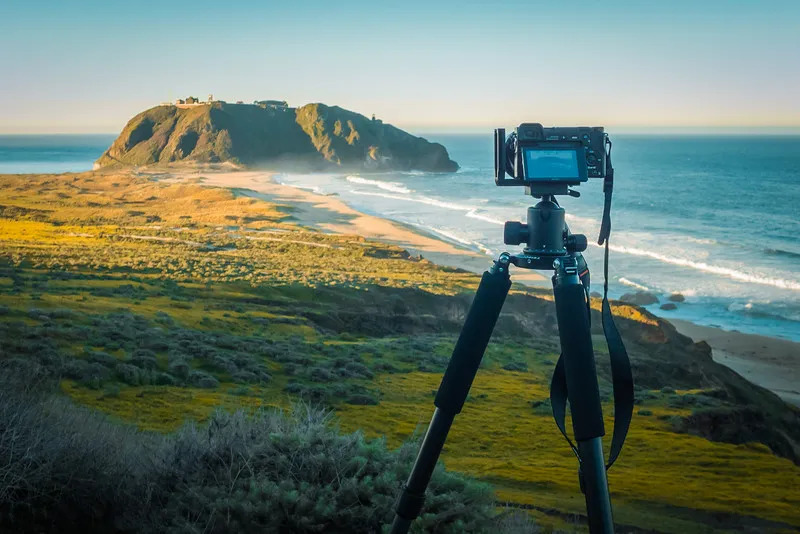
As any seasoned photographer will tell you, a sturdy tripod is an essential piece of kit. Whether you're shooting landscapes, architecture, product photos, or low-light scenes, a tripod can make all the difference between a blurry, amateurish shot and a razor-sharp, gallery-worthy image.
But simply slapping your camera on a tripod isn't enough. There's a bit of an art to using a tripod effectively and getting the most out of this trusty tool. In this article, we'll share five top tips to help you capture consistently sharp, professional-looking photos with the help of a tripod.
So, if you're tired of fuzzy, out-of-focus images and want to take your photography to the next level, read on! These simple tricks will have you shooting like a pro in no time.
Stabilize Your Camera
Let's start with the most obvious tip: use your tripod to stabilize your camera. After all, that's the whole point of having one, right? But there's a bit more to it than just plopping your camera on the tripod head and calling it a day.
Make sure your tripod is sturdy and level. Extend the legs to the appropriate height for your shooting position, and double-check that the whole setup is rock-solid. You don't want your camera shifting or vibrating mid-shot.
It's also a good idea to use your camera's self-timer or a remote shutter release when shooting with a tripod. This helps eliminate any camera shake that might occur when you press the shutter button. Trust me, those tiny movements can make a big difference in image sharpness, especially with longer exposures.
Switch Off Image Stabilization
This one might seem counterintuitive, but hear us out. Many modern cameras and lenses come equipped with built-in image stabilization (IS) or vibration reduction (VR) systems. These nifty features are designed to compensate for camera shake and blur, making them incredibly useful for handheld shooting.
However, when you're using a tripod, that image stabilization can actually work against you. The system may detect the slight movements of the tripod and try to "correct" them, resulting in a blurry, unstable image.
To avoid this, simply turn off your camera's or lens's image stabilization feature before shooting with a tripod. This will ensure that your camera's sensor is recording a sharp, stable image without any unwanted electronic corrections.
Clear the Camera Mirror
This tip is particularly important for DSLR shooters. Most DSLR cameras have a moving mirror that flips up when you take a photo, allowing light to reach the image sensor.
The problem is, this mirror movement can cause slight vibrations that can blur your image, especially with longer exposures. To combat this, make sure your camera's mirror is fully raised and out of the way before you take the shot.
You can do this by using your camera's mirror lockup feature, if it has one. This will raise the mirror and keep it up until you're ready to take the picture. Alternatively, you can use your camera's self-timer or a remote shutter release to trigger the exposure, which will also minimize mirror-induced shake.
Consider the Weather
When setting up your tripod, it's important to take the weather conditions into account. Wind, in particular, can be a real enemy of sharp, stable shots.
If you're shooting outdoors on a breezy day, try to position your tripod in a sheltered spot, like behind a wall or building. You can also add weight to the tripod's center column or hang a heavy bag from the hook underneath to help stabilize it against gusts of wind.
Rain and moisture can also be problematic, as they can cause your tripod to slip or become unstable. In wet conditions, consider using a tripod with rubber feet or spikes to grip the ground better. You might also want to invest in a tripod rain cover or umbrella to protect your gear.
Use a Remote Shutter Release
Finally, one of the best ways to ensure sharp, blur-free photos with a tripod is to use a remote shutter release. This nifty little accessory allows you to trigger the camera's shutter without actually touching the camera itself, eliminating any potential for camera shake.
Remote shutter releases come in both wired and wireless varieties, so you can choose the option that works best for your setup and shooting style. Wireless remotes are particularly convenient, as they let you step away from the camera and compose your shot from a distance.
Just remember to always use your remote shutter release in conjunction with your camera's self-timer. This double-barreled approach will ensure that your camera is as stable and shake-free as possible when the exposure is made.
Conclusion
There you have it - five essential tips to help you capture razor-sharp photos with the help of a trusty tripod. From stabilizing your camera and disabling image stabilization to considering the weather and using a remote shutter release, these techniques will have you shooting like a pro in no time.
Remember, a tripod is a powerful tool, but it's only as effective as the photographer using it. By mastering these tips and techniques, you'll be well on your way to taking your photography to new heights and creating images that truly shine.
So, what are you waiting for? Dust off that tripod and start putting these tips into practice. With a little bit of care and attention, you'll be capturing crystal-clear, professional-quality photos in no time.