
8 Distractions You Can Remove From Photos in Lightroom
-
 Loading...
 - Astrid Barfuss
- 25 Oct 2022
- 72 Views
- 0 Like
- 0 Comment
Whether you’re a beginner photographer or a seasoned pro, you’ve probably heard of Adobe Lightroom. For many picture-takers, it’s the go-to photo editing software. And if you’ve found annoyances in the images you took in real life, you can often get rid of them through the app.
Lightroom lets you fix technical problems with your camera, but you can also eliminate unwanted objects and distractions in a picture. And if you want a little more guidance on what you can remove, you’re in the right place.
This article will show you eight things you can remove from your photos in Lightroom.
1. Grain
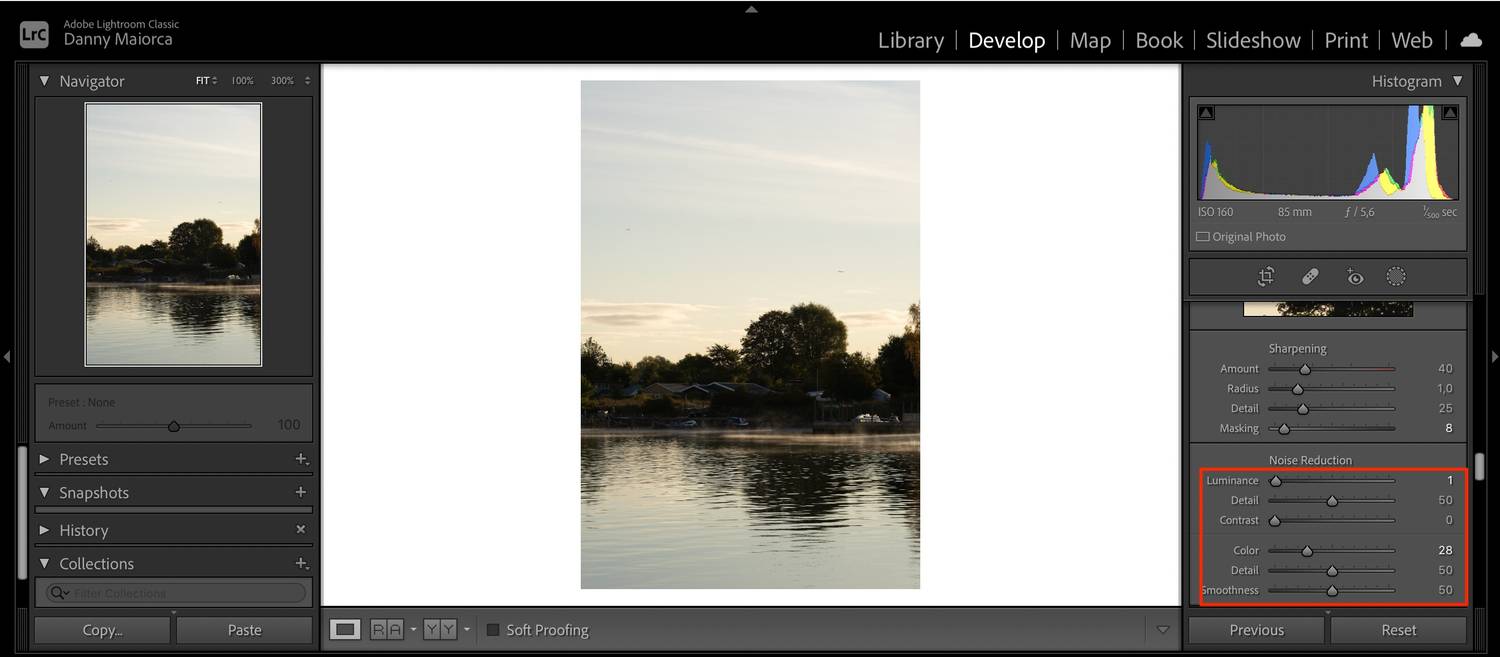
In some instances, you might want grain in your images. For example, you might try to create a vintage look in your photos. But unless you’re aiming for a specific style, you will often find that it’s a distraction.
Your images can become grainy for several reasons. It could be because your ISO is too high, and you might also notice grain if your picture is underexposed. While you sometimes can’t remove grain without negatively affecting the rest of your photo, it is possible in less serious circumstances. Read More...