How to Play Minecraft With Friends: 5 Different Ways
-
 Loading...
 - Atias Layla
- 05 Apr 2023
- 63 Views
- 0 Like
- 0 Comment
Playing Minecraft by yourself is a blast... but playing Minecraft with friends is an entirely new world of fun. If you're not sure how to play Minecraft with friends yet, fear not! We'll make it quick and easy for you in this article.
You have more than a few options for Minecraft Multiplayer; some of which require an internet connection, while you can play other methods offline and from the same room.
Regardless of how you want to craft, we'll look at how to play Minecraft with friends!
Minecraft Multiplayer for Public Servers
Java Edition
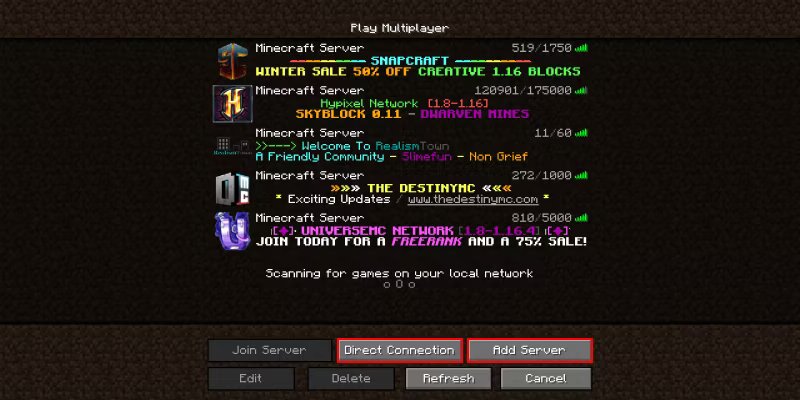
Public servers are what most Java players use to link up with others. Servers are free to join and you can find them by using any of the many server-listing sites such as MinecraftServers.org (just search "Minecraft Servers" in your web browser to find more listing sites).
We've covered an in-depth guide on How to Join a Minecraft Server already, but here's a quick rundown:
Copy the IP Address of the server you want to join. This will look something like "makeuseof.example.com"
Navigate to the Multiplayer screen in your Minecraft client. Click on Add Server or Direct Connection.
Paste the IP address into the box labeled Server Address. Read More…