How to use Smartsheet for project management
-
 Loading...
 - Brielle Durand
- 24 Mar 2023
- 90 Views
- 0 Like
- 0 Comment
Learn how to manage your tasks and keep your team on schedule with this Smartsheet project management tutorial.
Smartsheet is a unique project management solution that uses a spreadsheet-style grid to hold data while also adding key projecting management tools to help organize that data.
This use of a spreadsheet is helpful for teams or projects with detailed data that needs to be incorporated. Things such as complex budgets, time tracking or asset tracking are all made easier with the spreadsheet underpinnings of Smartsheet.
Below we’ll look at how to use Smartsheet for project management and go over its different features and views.
Smartsheet overview
When logging into Smartsheet, you will be welcomed by the main work area which consists of a left-hand menu that can access all of the major functions of project creation (Figure A).
Figure A
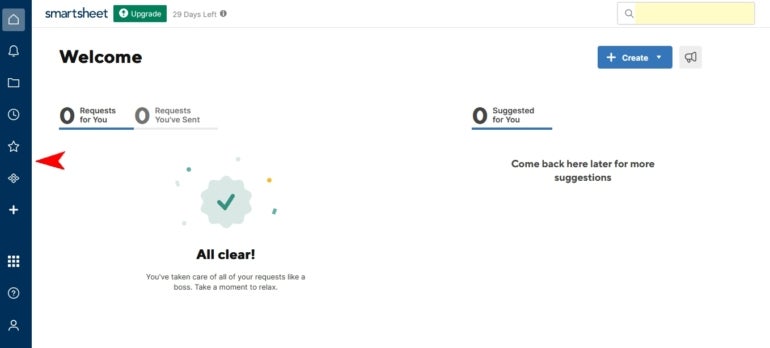
This left-hand work menu consists of these main items:
- Home icon: Use this to return to your main project overview or to manage workspaces.
- Notifications: This will alert you to notices from projects or team members.
- Browse: Here is where you will see all of your projects or create new ones. The Sheets folder is like your personal folder that is not shared (Figure B). Read More…