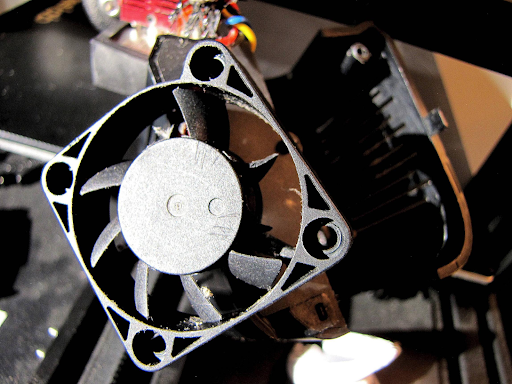
Upgrading Your 3D Printer Fan: What You Need to Know
-
 Loading...
 - 3D Printing USA
- 11 Mar 2025
- 60 Views
- 0 Like
- 0 Comment
Enhancing your 3D printer's performance often involves upgrading its components, and one of the most impactful modifications is upgrading the printer's fans. High-quality fans are crucial for maintaining optimal temperatures, ensuring print quality, and prolonging the lifespan of your printer. This article delves into the importance of 3D printer fans, considerations for upgrading, and where to buy high-quality 3D printer fans online in the USA.
The Role of Fans in 3D Printing
Fans for 3D printers serve two primary functions: cooling the extruded filament (part cooling) and regulating the temperature of internal components (hotend and power supply cooling).
- Part Cooling Fan: This fan cools the filament as it's deposited, helping it solidify quickly to maintain the desired shape and detail. Efficient part cooling is essential for achieving sharp corners, reducing stringing, and improving overall print quality.
- Hotend Cooling Fan: Dedicated to preventing heat creep, this fan cools the upper part of the hotend, ensuring that the filament doesn't soften prematurely, which could lead to clogs.
- Power Supply Fan: This fan dissipates heat generated by the power supply unit, maintaining safe operating temperatures and ensuring consistent performance.
Benefits of Upgrading Your 3D Printer Fans
Upgrading your 3D printer's fans can lead to several advantages:
- Noise Reduction: Stock fans are often noisy. Replacing them with high-quality, silent fans can significantly reduce operational noise, creating a more pleasant working environment.
- Improved Print Quality: Enhanced cooling leads to better print quality by allowing the filament to solidify more quickly and accurately, reducing defects like warping and stringing.
- Extended Component Lifespan: Efficient cooling prevents overheating, which can damage components over time. Upgraded fans help maintain optimal temperatures, extending the life of your printer's parts.
Considerations When Upgrading 3D Printer Fans
Before purchasing new fans, consider the following factors:
- Compatibility: Ensure the fan's size and voltage match your printer's specifications. Common sizes include 40x40x10mm and 50x50x15mm, with voltages typically at 12V or 24V.
- Airflow and Noise Level: Look for fans that offer a balance between high airflow (measured in CFM) and low noise (measured in dBA).
- Connector Type: Verify the connector type (2-pin, 3-pin, or 4-pin) to ensure it matches your printer's motherboard or requires an appropriate adapter.
- Quality and Brand Reputation: Opt for fans from reputable manufacturers known for reliability and performance.
Steps to Upgrade Your 3D Printer Fans
- Identify the Fans to Replace: Determine which fans need upgrading—part cooling, hotend, or power supply fans.
- Select Appropriate Replacements: Choose fans that meet your printer's specifications and your performance requirements.
- Gather Necessary Tools: You'll typically need screwdrivers, wire cutters, soldering equipment (if necessary), and appropriate connectors or adapters.
- Power Down and Unplug the Printer: Ensure the printer is turned off and unplugged to prevent electrical hazards.
- Remove the Old Fans: Carefully unscrew and disconnect the existing fans, noting their orientation and wiring.
- Install the New Fans: Mount the new fans, connect the wiring appropriately, and secure them in place. Ensure correct polarity to prevent malfunction.
- Test the Installation: Power on the printer and verify that the new fans operate correctly without unusual noises or vibrations.
For detailed guidance, resources like the Ender 3 Silent Fan Replacement Guide offer step-by-step instructions applicable to many printer models.
Where to Buy High-Quality 3D Printer Fans Online in the USA?
Several reputable online retailers offer a wide range of 3D printer fans:
- 3D Printing USA: Specializing in 3D printer parts and accessories, 3D Printing USA offers a selection of high-quality fans suitable for various printer models.
- Amazon: A vast marketplace where you can find numerous brands and models of 3D printer fans. Ensure to check reviews and seller ratings for quality assurance.
- RobotShop: Offers a variety of fans designed specifically for 3D printers, ensuring compatibility and performance.
- 3DJake: Provides a range of 3D printer fans known for efficient cooling and premium quality.
When purchasing online, always verify the seller's credibility, product specifications, and return policies to ensure a satisfactory buying experience.
Conclusion
Upgrading your 3D printer's fans is a worthwhile investment that can enhance print quality, reduce noise, and extend the lifespan of your machine. By selecting compatible, high-quality fans and following proper installation procedures, you can significantly improve your 3D printing experience. For a comprehensive selection of 3D printer parts, including top-tier fans, consider exploring the offerings at 3D Printing USA.



