Camera Modes
-
 Loading...
 - Jack Davis
- 11 Apr 2022
- 457 Views
- 0 Like
- 0 Comment
When you buy a digital camera, it will come with a selection of camera modes.
These are pre-programmed settings that allow you to choose the optimum shutter speed and aperture value for the photograph you want to take.
They are useful when you are starting out, but also for the experienced photographer who needs to capture a shot fast.
Familiarize yourself with these settings and get comfortable with them.
1 Auto Mode

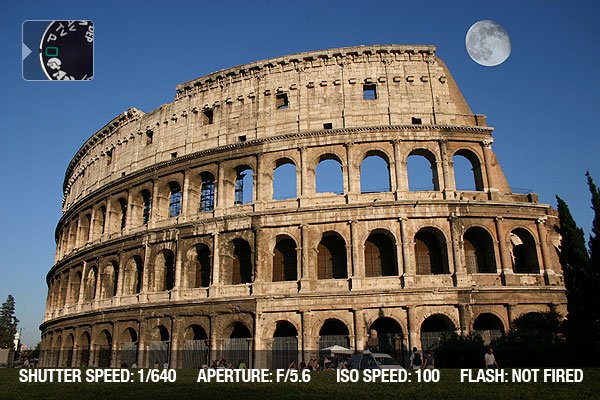
Automatic Exposure is when the camera chooses the optimum shutter speed, aperture, ISO and flash settings for your shot.
All you need to do is point and shoot.
This can be good if you have no idea of what settings to choose and also when you need to shoot quickly.
The shot here is correctly exposed as the day is well lit, though auto-exposure may struggle in situations where the light is uneven, and it tends to trigger the flash even when it’s not necessary.
2 Portrait Mode

Portrait mode will “think” that there is a subject in the foreground of the frame and choose a shallow depth of field to keep the human subject in focus but the background blurred.
If the camera reads the scene as dark, it will add fill-in flash.
Fill-in flash is useful in sunny conditions too, when the sun casts a harsh shadow.
Portrait mode generally works best in well-lit conditions.
3 Macro Mode

Macro mode is very useful for taking photographs of subjects smaller than your hand.
Remember that macro mode will not give you super close up images; for this, you will need a macro lens. Macro mode will work best in bright conditions and will choose a shallow depth of field to focus on the subject. Therefore, if light is low, use a tripod.
Your focusing also has to be more precise when taking a macro image. This is because when you use a shallow depth of field, you give yourself a smaller margin for error.
4 Landscape Mode

Landscape mode usually uses a small aperture (high f/number) to create a well-focused image from the foreground into the distance (on older cameras, the setting was ‘infinity’ represented by a sideways figure 8).
Landscape mode tends to suit a wide lens and works well if the scene is well lit. It will use flash if it reads the foreground as too dark, but you can manually turn this off.
5 Sports Mode

Because sports are fast-paced activities, sports mode will give you a high shutter speed of at least 1/500 – 1/1000 of a second.
With a high shutter speed to freeze movement, means that the flash is usually not necessary – though once again this works best on a bright day.
Sports mode can work well alongside continuous shooting mode, where images are taken consecutively resulting in many shots that capture the action. Read More...