
How to access your iPhone photos in the Windows 11 Photos app
-
 Loading...
 - Jenab Chan
- 17 Feb 2023
- 61 Views
- 0 Like
- 0 Comment
You can now more easily work with iCloud-synced photos via the Photos app in Windows 10.
Viewing and managing photos from your iPhone via iCloud has always been much easier on a Mac than on a Windows PC. That’s because iCloud access is built directly into the Mac.
Apple does make an iCloud for Windows app, but it doesn’t quite do the trick on its own. To help iPhone and iCloud users, Microsoft has added iCloud support to the Photos app in Windows 11. This means you can now view, open and edit your iCloud-synced iPhone pictures directly in the Photos app. Let’s see how it works.
How to access iCloud photos and videos in Windows
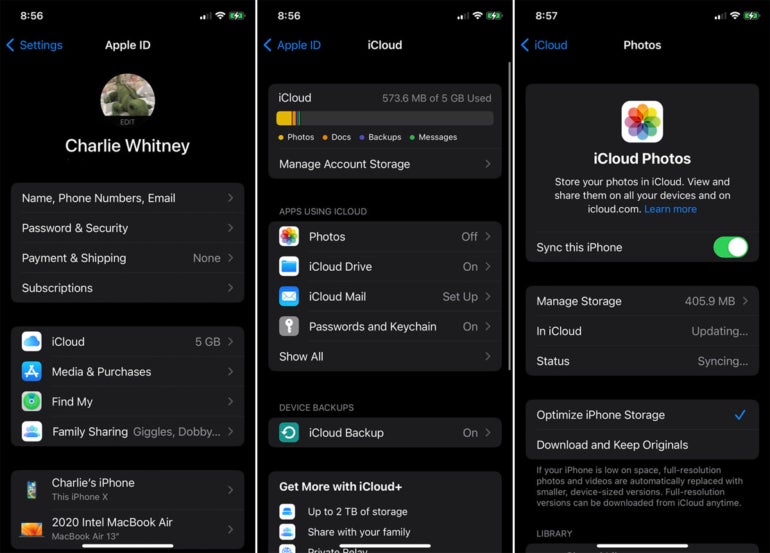
First, make sure you’re syncing your photos and videos to iCloud through your iPhone. On your phone, go to Settings, select your name at the top and then tap iCloud. In the section for Apps Using iCloud, tap the option for Photos and turn on the switch for Sync This iPhone if it’s not already on. Allow time for your photo library to sync to iCloud (Figure A).
Sign into your Windows 11 PC. Open the Microsoft Store, click Library and then download the latest updates for the different Windows apps. This will ensure that the Photos app is up to date. Read More…