
How to See How Many Friends You Have On Snapchat
-
 Loading...
 - Cynthia otoo
- 27 Jan 2023
- 67 Views
- 0 Like
- 0 Comment
Many social media platforms (Facebook, for example) display the exact number of friends you have on your profile. Snapchat doesn’t show how many friends you have, but there are several ways to get the information in the app.
We’ll show you how to see how many friends you have on Snapchat. This tutorial covers step-by-step instructions for Android and iOS.
Check the Location Sharing Settings
You can see all your Snapchat friends by disabling Ghost Mode and sharing your Snapchat location. Follow the steps below to configure your Snapchat’s location-sharing settings to show all your Snapchat friends.
- Tap your Bitmoji or profile icon to open your Snapchat profile.
- Tap the map in the Snap Map section.
- Select the Settings icon in the top-right corner of the Snapchat map.
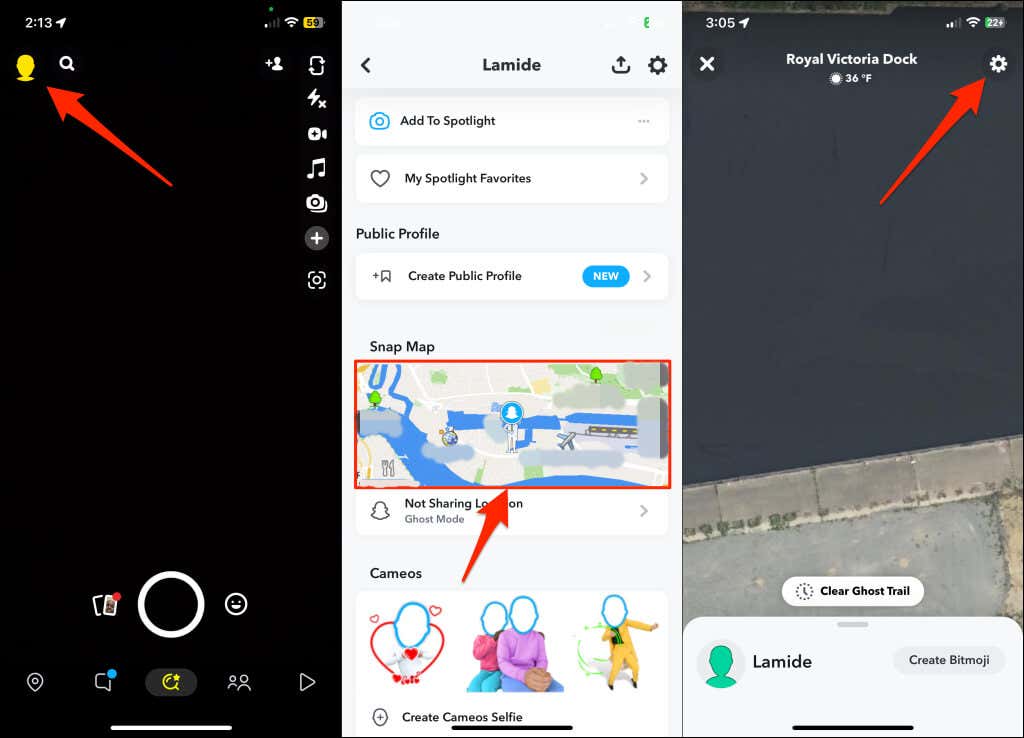
- Toggle off Ghost Mode and select Only These Friends.
- Select the Select All icon at the top-right corner of the “Recents” section and tap Save to continue. Read More…