LinkedIn Adds New Templates for Posts to Facilitate More Creative Updates
-
 Loading...
 - Solange Hawa
- 17 Aug 2022
- 87 Views
- 0 Like
- 0 Comment
LinkedIn continues to add new ways to help creators maximize engagement in the app, this time via a new templates option for posts, which provides a range of text formatting and background options for your LinkedIn updates.
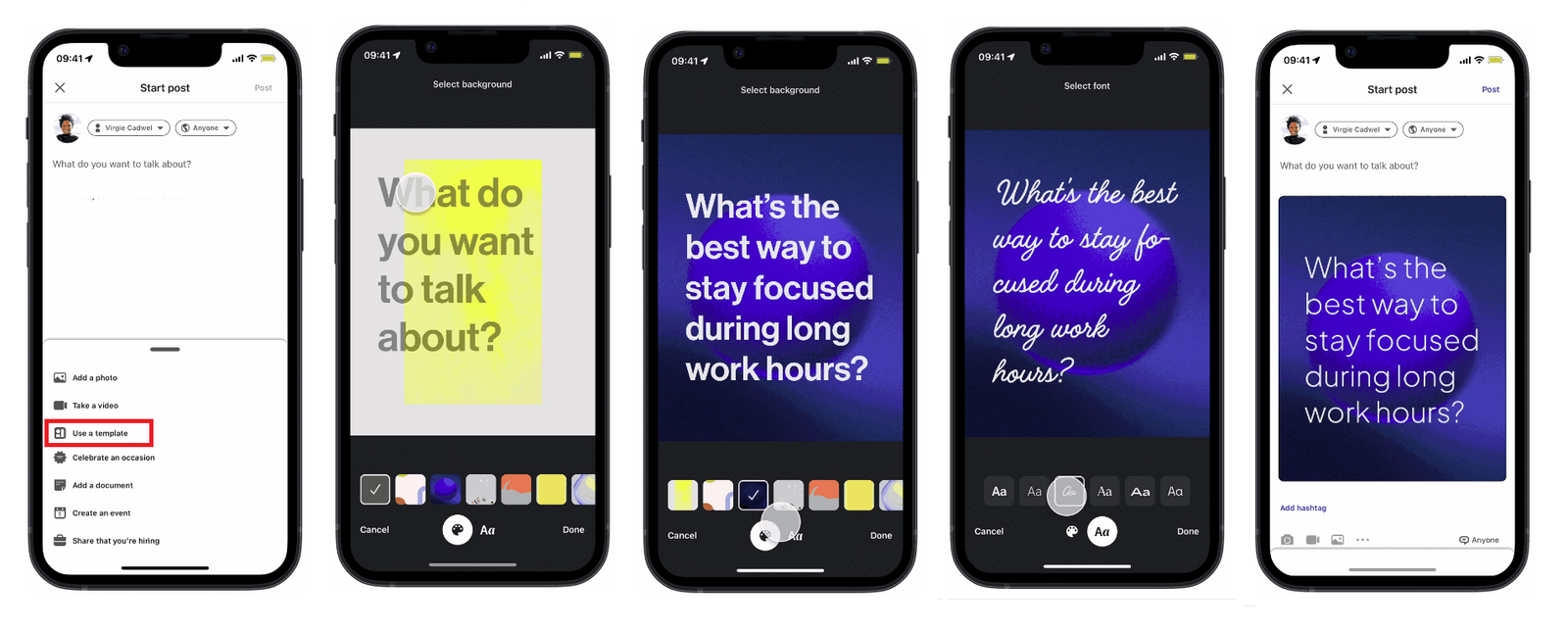
As you can see in this sequence, you can now tap on the new ‘Use a Template’ option in the post creation flow, which will provide you with a range of options to customize your post.
As explained by LinkedIn:
“Choose from dozens of customizable backgrounds and fonts, add your own text, and hit “Share”. You can even add a clickable link onto templates to encourage your audience to take action.”
Which is in reference to LinkedIn’s recently added link sticker tool, another option to add a different angle to your LinkedIn updates.
It’s an interesting addition, which will certainly add some more variety to your LinkedIn feed – though whether you actually want these bright, stand-out posts filling up your LinkedIn stream is another question entirely.
Do people really want LinkedIn to look even more like Facebook? Do these types of templates and tools align with the professional focus of the app?
Honestly, the font in the second to last image above looks horrendous, and I can’t see that adding anything good to the LinkedIn process.
Then again, as with all social platforms, LinkedIn needs to move with the times and trends – and in that respect, it’s kind of surprising that it’s taken this long to launch these templates.
A year ago, LinkedIn acquired how-to video platform Jumprope, which also brought with it Jumprope’s various creative tools and templates. Read More...