Microsoft’s New Windows 11 Start Menu
-
 Loading...
 - Elettra Barone
- 14 Apr 2025
- 32 Views
- 0 Like
- 0 Comment
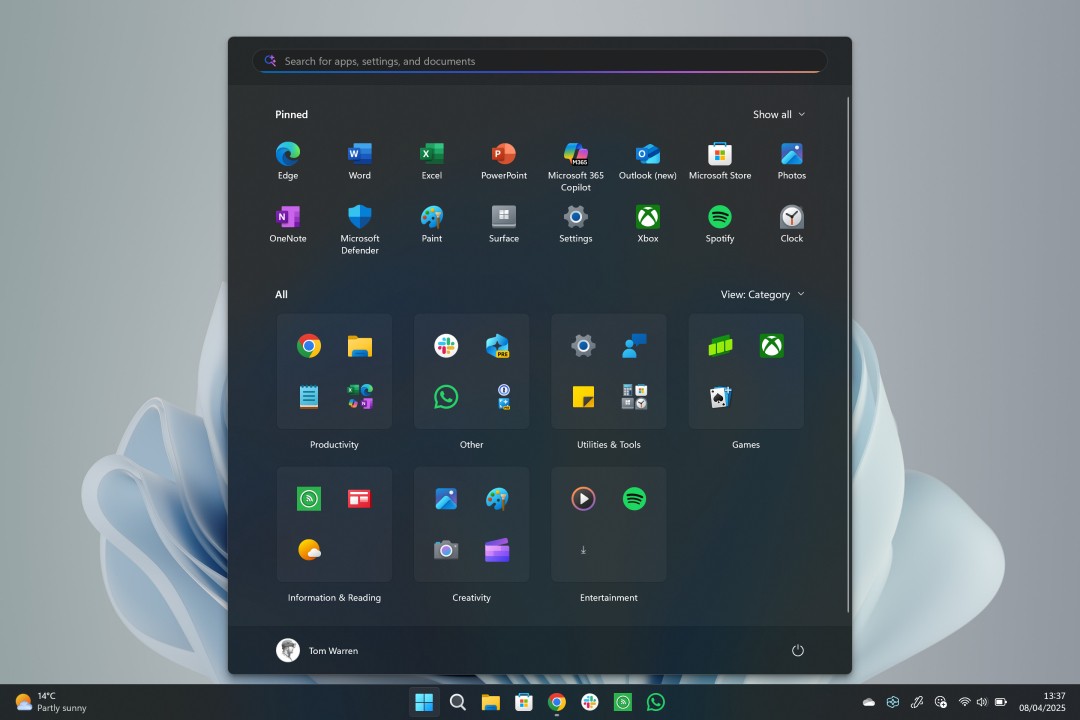
Microsoft is set to enhance the user experience with a redesigned Start menu in Windows 11, addressing long-standing user feedback. The new design, which has been discovered in recent builds, features a larger layout that offers greater customization options, making it a significant improvement over the current version.
One of the most notable changes is the ability to disable the recommended feed of files and apps, a feature that has been a major pain point for many users transitioning from Windows 10. The recommended feed often takes up valuable space on the Start menu, cluttering the interface with recent files and apps that not everyone finds useful. With the new design, users can now enjoy a cleaner and more streamlined Start menu that keeps everything on a single scrollable page.
Additionally, the updated Start menu allows for easier access to all apps without the need to navigate to a separate section. Users can choose between a category view or a list format for the all apps section, tailoring the interface to their preferences. This flexibility enhances usability and makes it simpler to find and launch applications.
The larger Start menu also accommodates more pinned apps, allowing users to pin up to eight applications per row, with no limit on the number of rows. This change significantly increases the number of apps that can be easily accessed, making multitasking more efficient.
Microsoft has begun testing this new Start menu design in the 24H2 builds of Windows 11, and it has also backported the changes to the 23H2 versions. This indicates that the revamped Start menu will likely be rolled out to all Windows 11 users in the coming weeks or months, providing a more user-friendly experience that aligns with the needs and preferences of its user base.
Overall, the new Start menu design represents a thoughtful response to user feedback, enhancing both functionality and aesthetics in Windows 11. As Microsoft continues to refine its operating system, users can look forward to a more customizable and efficient interface that improves their overall computing experience.