Raw Vs Jpeg – Pros And Cons Of Raw And Jpeg
-
 Loading...
 - Layla Fouad
- 02 Jun 2022
- 277 Views
- 0 Like
- 0 Comment
Raw Vs JPEG Pros and Cons – If you’re new to photography then the raw vs JPEG question can be a tricky one to get your head around. For that reason in this guide we’ll cover what raw and JPEG files are, how they differ and the pros and cons of shooting in each. We’ll also touch upon raw software and image editing tips so if you want to take that next step with your photography you can.
Raw and JPEG? I’m confused…
In a nutshell raw and JPEG are simply file formats that your camera records. You can set your camera to shoot in just raw, JPEG or both. Depending on your camera system will depend on how you access the setting – most are under an ‘Image Quality’ setting in the main shooting menu.

What is a Raw file?
A raw file is an uncompressed and unprocessed image. It’s worth noting many cameras on modern smartphones can shoot in raw too. Most, if not probably all, professional photographers and serious hobbyists shoot using a raw file format as they produce far higher quality results compared to a JPEG.
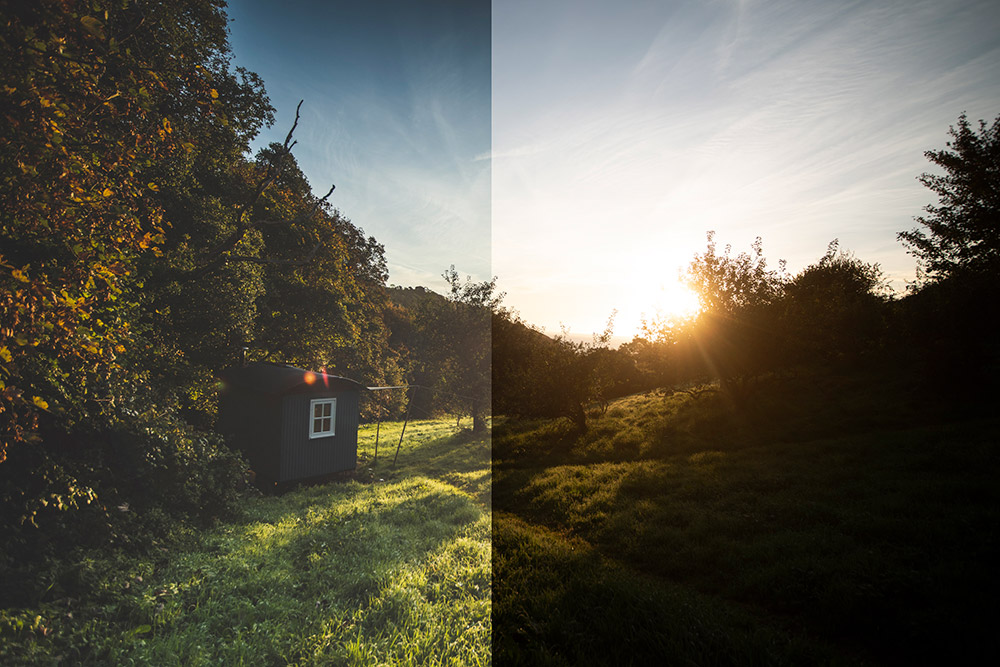
A raw file is not ready to be printed or displayed until it has been processed through some sort of image editing software. In fact a raw file looks dull and soft when it comes out of the camera. Beginners may even think there is something wrong with their camera when reviewing a raw image file as they can look very flat!
Think of raw like shooting film (for those old enough to remember!) Once you’ve shot a film, to see the images you need to develop and process the negatives. It’s the same for digital raw image. Once you’ve shot your images you need to develop and process the raw files on a computer to bring out what you’ve captured. How you process them we’ll cover later on.

What is a JPEG file?
A JPEG file is a compressed image file format that your camera has processed. As the file has been compressed it means your camera has deliberately lost some of the image data to make the file smaller in size.
When shooting in the JPEG format your camera processes basic settings like the contrast, saturation and sharpening effects. This is great if you have no intention or enthusiasm to process your final images, however on the downside your camera is making all the creative decisions for you, and you have less control over the final outcome.
It’s also important when shooting in a JPEG file format to ensure your exposure settings are spot on. There is a lot less option to rescue any incorrectly exposed shadow and highlight detail at the editing stage. You can still edit a JPEG file to a certain degree but if you push and pull the pixels around too much you’ll start to encounter a problem called banding where your images appear more pixelated.
We recommend that if you’re going to shoot JPEGs, set your camera to the highest possible quality. You can always downsize your JPEG images on your computer if you need them to be smaller but you can’t upscale them if you’ve shot the orginals at a lower quality (without additional difficulty).

Now you know what Jpegs and raw files are, lets recap on the advantages and disadvantages:
Pros and cons of shooting RAW
What are the advantages of shooting in raw?
- Raw files produce high quality results.
- You can recover the highlight and shadow detail in a raw file to a far greater level compared with a JPEG, giving improved dynamic range.
- You can extensively edit raw files to boost the tone, sharpen the image, and make many other basic image adjustments.
- You can adjust the white balance setting in a raw file post production meaning you don’t need to worry about this setting when shooting.
What are the disadvantages of shooting in raw?
- The file sizes are larger than JPEGs therefore they take up more storage space on your memory card and computer.
- Raw files come out of the camera appearing flat. If you don’t process them they are no good. You cannot upload raw files directly to social media or online.
Pros and cons of shooting JPEGs
What are the advantages of shooting JPEG?
- They are much smaller in size so therefore take up less storage space on your memory card and computer.
- Your camera makes all the basic edit adjustments – this is an advantage if you have no interest in editing your images or you want to quickly upload images from a shoot onto social media with minimum fuss.
What are the disadvantages of shooting JPEG?
- Less creative control at the editing stage, for example you’re unlikely to be able to rescue the blown out highlights in the sky of a JPEG file.
- Your camera is making the basic image edit adjustments. This means you have less creative control over the final outcome.
- You can’t correct the white balance setting at the editing stage. You need to shoot this right in camera.
- If you over edit a JPEG file you get a technical issue called banding and the image appears more pixelated.

-
What software should I use?
Whether you choose to shoot in raw or JPEG you’ll need image editing software to make the most out of your images.
If you’ve shot in raw you need to make sure the image software you are using is compatible with your camera’s raw format. Depending on the make of camera will determine what type of raw file your camera produces. For example a Canon camera produces a .CR2/.CR3 raw file, Nikon a .NEF file, Sony an .ARW and Fujifilm’s raw format is an .RAF to name just a few of the major camera manufacturers. If you are having compatibility issues you can convert your original raw file to a DNG file using Adobe’s DNG Converter. A DNG stands for Digital Negative and is a more universally read raw image file format.
There are many excellent software packages out there designed to boost your images – some you have to pay for whereas others are free. For example Nikon’s own raw software NX Studio is free to download (for Nikon users only), and Canon have a similar program called Digital Photo Professional (DPP) which has been designed for the CR2/CR3 file (Canon users only). If you have a different camera see our guide to manufacturers photo editing software.
Other image editing programs that may by of interest:
- Adobe Lightroom Classic
- Adobe Lightroom CC
- Adobe Camera Raw
- Adobe Photoshop Elements
- Capture One
- Affinity Photo
- DxO PhotoLab
- DxO PureRaw 2
- ON1 Photo RAW
- Exposure X7
- CyberLink PhotoDirector. Read More...