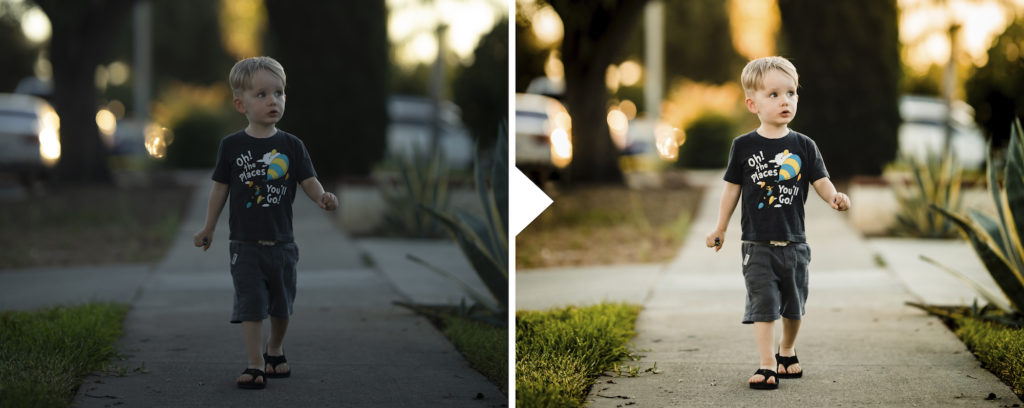
The Best Way to Use Photo Presets
-
 Loading...
 - Davino Malaya
- 19 May 2023
- 66 Views
- 0 Like
- 0 Comment
In today's digital age, photography has become more accessible than ever before. With the rise of smartphones and affordable DSLR cameras, capturing moments has become a widespread hobby. To enhance the aesthetic appeal of their photos, many photographers turn to photo presets. These pre-configured settings offer a quick and convenient way to edit images and achieve a desired look. However, using photo presets effectively requires some knowledge and finesse. In this article, we will explore the proper way to use photo presets to elevate your photography game and create stunning visuals.
Using photo presets can significantly enhance the look and feel of your images. However, it's crucial to understand that presets are not a one-size-fits-all solution. They should be used as a starting point and adjusted according to the specific needs of each photograph. Here are some essential tips for using photo presets effectively:
1. Familiarize Yourself with the Preset
Before diving into the editing process, take a moment to study the preset you've chosen. Every preset is unique and designed to achieve a particular aesthetic. By understanding the characteristics of the preset, you'll have a better idea of how it will affect your photo. Pay attention to the changes in color, contrast, saturation, and other aspects that the preset applies.
2. Choose the Right Preset for the Mood
Different presets evoke different moods and styles. Some presets enhance warm tones, while others excel in creating moody or vibrant looks. Consider the atmosphere you want to convey in your photo and select a preset that aligns with your vision. Experimentation is key here, so don't be afraid to try different presets until you find the perfect match.
3. Adjust the Basic Settings
While presets offer a great starting point, it's rare to find a preset that requires no adjustments. After applying the preset, evaluate the overall look of your photo and make necessary tweaks to the basic settings. This may include adjusting exposure, white balance, contrast, and clarity. Fine-tuning these settings ensures that the preset works harmoniously with your image.
4. Customize the Preset to Suit Your Photo
To make your photos truly unique, don't hesitate to customize the preset further. Photo editing is an art form, and presets are just tools to assist you in the process. Experiment with different sliders and settings to achieve the desired effect. Play around with the saturation, hue, and tone curves to make the preset adapt to your specific photo.
5. Use Presets Sparingly
Presets are meant to enhance your images, not overpower them. It's important to exercise restraint and use presets sparingly. Overusing presets can lead to unrealistic and overedited photos. Instead, aim for subtle adjustments that enhance the natural beauty of your image without overwhelming it.
6. Apply Presets Consistently
For photographers who want to maintain a consistent aesthetic across their body of work, using presets consistently is essential. By applying the same or similar presets to all your photos, you create a cohesive visual style. This approach helps establish your brand as a photographer and makes your work recognizable.
Frequently Asked Questions
1. Can I use photo presets with any editing software?
Yes, photo presets can be used with a variety of editing software. Popular programs such as Adobe Lightroom and Photoshop support the use of presets. Additionally, many mobile apps also offer preset functionality.



