What is Focus Peaking? A Guide to the Manual Focusing Aid
-
 Loading...
 - Mustafa Mansouri
- 04 Aug 2022
- 92 Views
- 0 Like
- 0 Comment
When using manual focus, it’s difficult to tell exactly where your plane of focus is. It’s possible to make a guess using your eye, but you can still be slightly off and end up with an image that is out of focus. Similar to how histograms take the guesswork out of exposure, focus peaking uses an algorithm and a simple visual aid to help take the guesswork out of manually focusing your lens.
What is Focus Peaking?
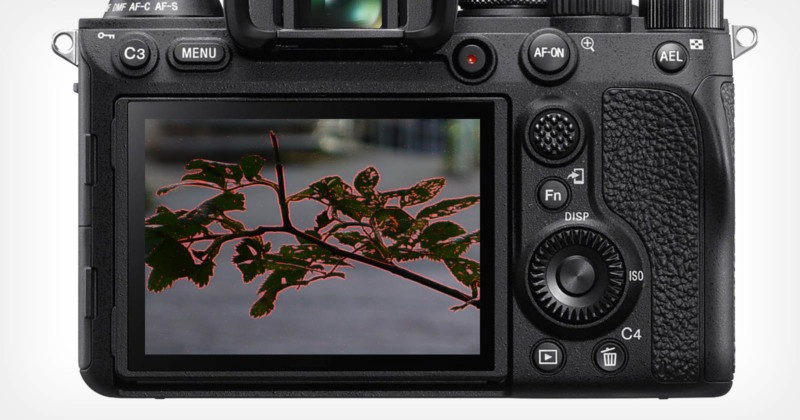
Focus peaking helps you pinpoint the areas of your image that are in focus by overlaying a color to highlight the areas of your image that are in focus. The color overlay is displayed in real-time on your camera’s LCD screen, so you are able to see how your image’s focus changes with turns of the focusing ring on your lens.
Changing the plane of focus with focus peaking enabled. Notice how the indicator pixels show focusing planes at different distances from the camera.
It is available when using manual focus (and on some cameras, manual focus exclusively), and can make the daunting task of manually focusing your lens much simpler. In today’s photography world, manual lenses are popular and can be some of the sharpest pieces of glass when focused properly.
Although videography was the first field to make wide use of focus peaking, the photography world has adopted it with the advancement of mirrorless camera technology. Most recent mirrorless cameras come with focus peaking as a feature, and some DSLR cameras have it as well. Some manufacturers refer to it by a different name, such as “peaking highlights” or “focus assist.”
Another example of focus peaking providing its visual indicator overlay for changing planes of focus.
In addition to helping photographers determine what parts of their image are in focus, focus peaking also helps visualize the effects of changing aperture. At a wide aperture, such as f/1.8, the plane of focus is small, and only part of the image will be in focus. In this scenario, focus peaking will only overlay color on a small part of the image.
At a narrow aperture, such as f/22, the plane of focus is large, and a large portion of the image will be in focus. In this case, focus peaking will overlay color on a large part of the image. This is useful in situations when you aren’t sure what aperture will give you the depth of field that you want.
How to Access Focus Peaking
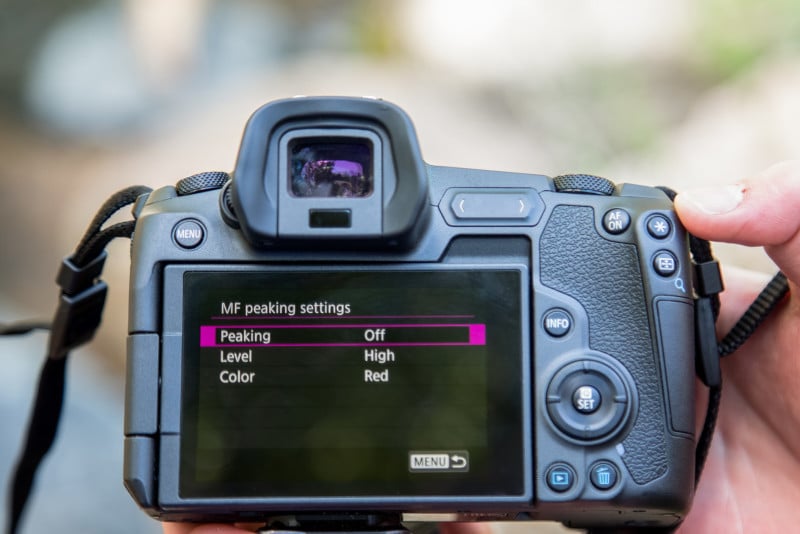
Most cameras will have focus peaking settings grouped with other focusing settings, and some will only let you access focus peaking when your lens is in manual focus. To switch your lens to manual focus (provided that you have a lens with autofocus), find the switch on the lens that has AF and MF, and switch it to MF.
While every camera is different, it’s important to note that your camera may not have focus peaking. Make sure to read your camera’s manual, looking for anything under “focus peaking,” “peaking highlights,” “focus assist,” or general focusing aids.
If your camera doesn’t have focus peaking built-in, you are not out of luck. Since videography has used focus peaking for a while, most external monitors meant primarily for video have focus peaking. The biggest downside is that they aren’t the cheapest accessories, but if you find yourself needing a way to check your focusing accuracy, you may want to consider an investment.
Simply plug in the external monitor to your camera and access focus peaking on the monitor itself. Before purchasing, ensure that the monitor has built-in focus peaking and that it is compatible with your camera. Online camera stores often have external camera monitors on sale around holidays. Read More...