WhatsApp needs to stop hamstringing linked devices for no reason
-
 Loading...
 - Belle Rolland
- 20 Feb 2023
- 64 Views
- 0 Like
- 0 Comment
Sometimes your primary device has to remain online
WhatsApp is easily one of the most popular encrypted messaging apps out there. Parent company Meta regularly adds new features and capabilities to the app, and while we have to give WhatsApp credit for staying competitive with rivals like Telegram, problems like half-baked missed call alerts are just the tip of the iceberg when it comes to issues the platform still struggles with. Maybe one of the most annoying there concerns how multi-device connectivity works, and close to two years after we first got it, linked and primary devices still don’t enjoy feature parity.
WhatsApp multi-device: A quick walkthrough
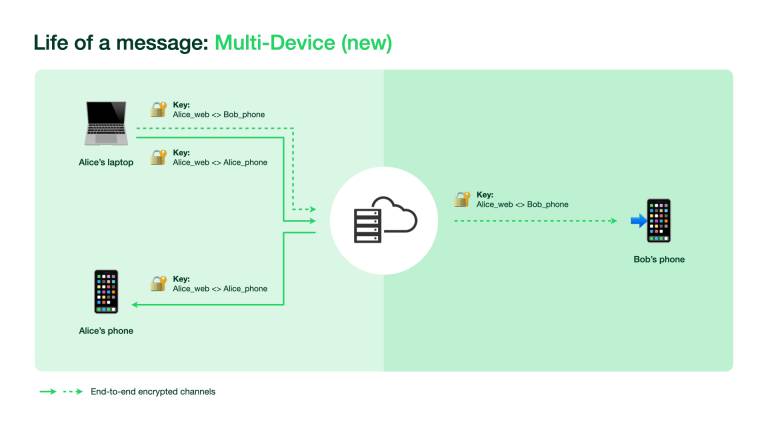
If you aren’t a regular WhatsApp user, or have been living under a rock, its multi-device support allows you to access one user account even as you jump between hardware. You have one primary device, which must be a smartphone, and up to four additional devices — though for the most part, those are limited to computers. Since early 2022, each linked device lets you access your account, even when the primary smartphone is offline. Registered beta testers can even go the extra mile and set up another smartphone or tablet as one of the four linked devices, with no painstaking workarounds. I’m a member of this now-closed beta program, and this is where the woes begin.
Adding new contacts is easy (Terms and conditions apply)
WhatsApp doesn’t let you start new conversations with unsaved phone numbers. As a result, I often save people’s contact details on my Pixel 7 using the Google dialer or the Contacts app, and then return to WhatsApp. However, looking up the freshly saved contact name using the in-app search function or the new chat button is an exercise in futility, because I have the Pixel 7 configured as a linked smartphone. The experience is the same on desktop and other linked devices — WhatsApp doesn’t allow initiating conversations with newly saved phone numbers. Read More…