How to drive traffic from social media to your website
-
 Loading...
 - Kathy Grant
- 11 Apr 2022
- 324 Views
- 0 Like
- 0 Comment
Want to increase the traffic that comes to your website via your social media channels?
Take a look below for some ideas, best practices and examples from our experts, as well as research data and specialist interviews. These should help you increase click-throughs and improve your social media referral metrics.
Tips to increase website traffic from social media
1. Start with the basics: Increase reach and engagement
2. Focus on the social media platforms that drive the most web traffic
3. Include referral links on your social media profiles
4. Add links to your posts
5. Review your post frequency strategy to maximize traffic
6. Share links in social media groups
7. Use content techniques that encourage click-throughs
8. Increase traffic through social media shares
Tip 1. Start with the basics: Drive traffic by increasing reach and engagement
Any strategy that helps you increase your social media reach, engagement and number of (quality) followers will also help get more eyes on your posts and profile, and grow brand familiarity. This should then naturally increase your social media referral traffic.
So, our very first tip is to make sure you’re already following general social media best practices. From posting regularly and interacting with your followers, to creating timely content with eye-catching visuals, apply the best practices that are most relevant to your brand and audience to increase your social media metrics. Check out these social media best practices by HubSpot if you need help getting started.
But in addition to general social media best practices, there are plenty of tactics you can use to specifically drive traffic to your website through social media. Let’s dive into these.
Tip 2. Focus on the social media platforms that drive the most web traffic
If your goal is to increase your traffic from social media, a good place to start is by choosing the best-suited social media platform(s) for the job. So which is the best social media platform to drive traffic to your website?
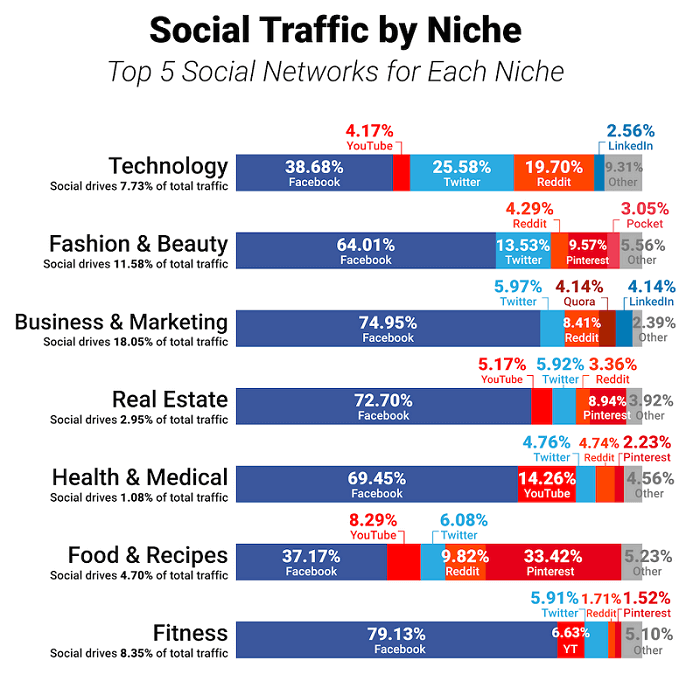
According to Search Engine Journal, GrowthBadger and The Economist’s findings, Facebook is the best platform for social media referrals. This isn’t surprising, when Facebook remains the most popular social media network. But Twitter can also be hugely influential when Tweets go viral, which can lead to high volumes of traffic.
Meanwhile, the research found that Instagram and Pinterest are some of the social media networks that drive the least traffic to external websites. However, the data varies widely per industry, so understanding the best social media channel for your brand and audience is also key to driving the most traffic to your website.
Tip 3. Include referral links on your social media profiles
Every social media profile has a small area reserved to presenting yourself to your followers. Whether it’s called a “bio” (on Twitter, TikTok or Instagram) or an “about section” (on LinkedIn, Facebook or YouTube). Here you can include link(s) to your website. This way users know where to go if they want to see more from you, helping you easily direct this traffic from social media to your website.
Often, you can put more than one link in your bio. This offers your followers a greater variety of options, helping them find what’s relevant to them and reducing any friction in their journey to find out more information.
However, this is not possible on all social media platforms. For example, you can only include one link on your Instagram or TikTok profile. A solution to this problem could be linking to a dedicated landing page, where you can list several useful links. This service is offered by platforms such as Linktree, Later’s Linkin.bio and Taplink. Or you can simply create your own landing page on your website. Read More…