WhatsApp Adds 12 New Features to Enhance Chats, Calls, Status, and More

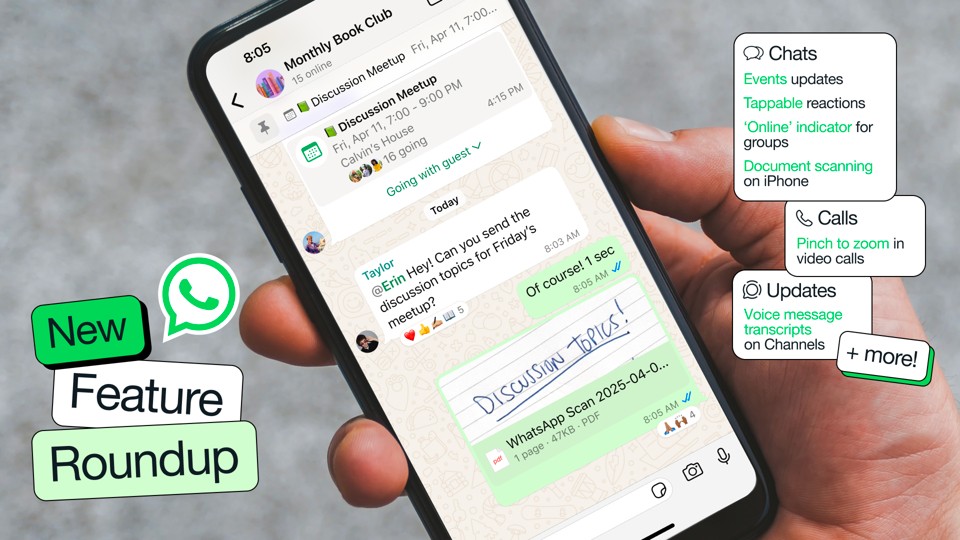
In April, WhatsApp is rolling out a dozen new features aimed at improving the messaging and calling experience for users, while also providing enhanced functionality for creators through Channels. These updates are designed to make interactions on the platform more engaging and efficient. Here’s a roundup of the new features that are being introduced:
1. Online Status in Group Chats
Users can now see how many people are currently online in a group chat through an ‘Online’ indicator displayed under the group name, making it easier to gauge participation.
2. Highlight Notifications in Groups
WhatsApp introduces a new ‘Notify for’ setting that allows users to prioritize alerts. You can choose to receive notifications only for @mentions, replies, and messages from saved contacts by selecting ‘Highlights,’ or opt to receive all notifications by choosing ‘All.’
3. 1:1 Event Creation
The ability to create events is no longer limited to group chats. Users can now create events in 1:1 conversations, with options to RSVP as ‘Maybe,’ add a plus one, and set end dates. Events can also be pinned in chats for easy access.
4. Tappable Message Reactions
Similar to Slack, users can now co-sign someone else’s emoji reaction by simply tapping to send the same reaction instantly, enhancing interaction in chats.
5. Document Scanning on iPhone
iOS users can now scan and send documents directly from the attachment tray by selecting ‘Scan document,’ streamlining the process of sharing important files.
6. Set WhatsApp as Default on iPhone
With the latest iOS update, users can set WhatsApp as their default app for messaging and calls through the Settings menu, making it more convenient for iPhone users.
7. Pinch to Zoom During Video Calls
iPhone users can now zoom in during video calls by pinching the screen, allowing for a closer look at the conversation.
8. Add People to Calls from Chat
During an ongoing 1:1 call, users can now add someone else by tapping the call icon at the top and selecting ‘Add to call,’ making it easier to include others in conversations.
9. Better Video Call Quality
WhatsApp has improved its routing technology to reduce freezing and call drops. The app now adapts more quickly to internet bandwidth and upgrades to HD quality when possible.
10. Video Notes for Channels
Admins can now record and post 60-second video updates in Channels, similar to how they share updates in chats, enhancing communication with followers.
11. Voice Message Transcripts on Channels
For those who can’t listen to voice messages, WhatsApp now provides transcriptions of voice updates on Channels, allowing users to read them on the go.
12. QR Codes for Channels
Admins can generate unique QR codes for their channels, which can be shared online to help grow their community and increase engagement.
These new features reflect WhatsApp's commitment to enhancing user experience by making communication more efficient and enjoyable. Whether through improved group interactions, better call quality, or new functionalities for creators, these updates aim to keep WhatsApp at the forefront of messaging platforms.