Home Upload Photo Upload Videos Write a Blog Analytics Messaging Streaming Create Adverts Creators Program
Bebuzee Afghanistan Bebuzee Albania Bebuzee Algeria Bebuzee Andorra Bebuzee Angola Bebuzee Antigua and Barbuda Bebuzee Argentina Bebuzee Armenia Bebuzee Australia Bebuzee Austria Bebuzee Azerbaijan Bebuzee Bahamas Bebuzee Bahrain Bebuzee Bangladesh Bebuzee Barbados Bebuzee Belarus Bebuzee Belgium Bebuzee Belize Bebuzee Benin Bebuzee Bhutan Bebuzee Bolivia Bebuzee Bosnia and Herzegovina Bebuzee Botswana Bebuzee Brazil Bebuzee Brunei Bebuzee Bulgaria Bebuzee Burkina Faso Bebuzee Burundi Bebuzee Cabo Verde Bebuzee Cambodia Bebuzee Cameroon Bebuzee Canada Bebuzee Central African Republic Bebuzee Chad Bebuzee Chile Bebuzee China Bebuzee Colombia Bebuzee Comoros Bebuzee Costa Rica Bebuzee Côte d'Ivoire Bebuzee Croatia Bebuzee Cuba Bebuzee Cyprus Bebuzee Czech Republic Bebuzee Democratic Republic of the Congo Bebuzee Denmark Bebuzee Djibouti Bebuzee Dominica Bebuzee Dominican Republic Bebuzee Ecuador Bebuzee Egypt Bebuzee El Salvador Bebuzee Equatorial Guinea Bebuzee Eritrea Bebuzee Estonia Bebuzee Eswatini Bebuzee Ethiopia Bebuzee Fiji Bebuzee Finland Bebuzee France Bebuzee Gabon Bebuzee Gambia Bebuzee Georgia Bebuzee Germany Bebuzee Ghana Bebuzee Greece Bebuzee Grenada Bebuzee Guatemala Bebuzee Guinea Bebuzee Guinea-Bissau Bebuzee Guyana Bebuzee Haiti Bebuzee Honduras Bebuzee Hong Kong Bebuzee Hungary Bebuzee Iceland Bebuzee India Bebuzee Indonesia Bebuzee Iran Bebuzee Iraq Bebuzee Ireland Bebuzee Israel Bebuzee Italy Bebuzee Jamaica Bebuzee Japan Bebuzee Jordan Bebuzee Kazakhstan Bebuzee Kenya Bebuzee Kiribati Bebuzee Kuwait Bebuzee Kyrgyzstan Bebuzee Laos Bebuzee Latvia Bebuzee Lebanon Bebuzee Lesotho Bebuzee Liberia Bebuzee Libya Bebuzee Liechtenstein Bebuzee Lithuania Bebuzee Luxembourg Bebuzee Madagascar Bebuzee Malawi Bebuzee Malaysia Bebuzee Maldives Bebuzee Mali Bebuzee Malta Bebuzee Marshall Islands Bebuzee Mauritania Bebuzee Mauritius Bebuzee Mexico Bebuzee Micronesia Bebuzee Moldova Bebuzee Monaco Bebuzee Mongolia Bebuzee Montenegro Bebuzee Morocco Bebuzee Mozambique Bebuzee Myanmar Bebuzee Namibia Bebuzee Nauru Bebuzee Nepal Bebuzee Netherlands Bebuzee New Zealand Bebuzee Nicaragua Bebuzee Niger Bebuzee Nigeria Bebuzee North Korea Bebuzee North Macedonia Bebuzee Norway Bebuzee Oman Bebuzee Pakistan Bebuzee Palau Bebuzee Panama Bebuzee Papua New Guinea Bebuzee Paraguay Bebuzee Peru Bebuzee Philippines Bebuzee Poland Bebuzee Portugal Bebuzee Qatar Bebuzee Republic of the Congo Bebuzee Romania Bebuzee Russia Bebuzee Rwanda Bebuzee Saint Kitts and Nevis Bebuzee Saint Lucia Bebuzee Saint Vincent and the Grenadines Bebuzee Samoa Bebuzee San Marino Bebuzee São Tomé and Príncipe Bebuzee Saudi Arabia Bebuzee Senegal Bebuzee Serbia Bebuzee Seychelles Bebuzee Sierra Leone Bebuzee Singapore Bebuzee Slovakia Bebuzee Slovenia Bebuzee Solomon Islands Bebuzee Somalia Bebuzee South Africa Bebuzee South Korea Bebuzee South Sudan Bebuzee Spain Bebuzee Sri Lanka Bebuzee Sudan Bebuzee Suriname Bebuzee Sweden Bebuzee Switzerland Bebuzee Syria Bebuzee Taiwan Bebuzee Tajikistan Bebuzee Tanzania Bebuzee Thailand Bebuzee Timor-Leste Bebuzee Togo Bebuzee Tonga Bebuzee Trinidad and Tobago Bebuzee Tunisia Bebuzee Turkey Bebuzee Turkmenistan Bebuzee Tuvalu Bebuzee Uganda Bebuzee Ukraine Bebuzee United Arab Emirates Bebuzee United Kingdom Bebuzee Uruguay Bebuzee Uzbekistan Bebuzee Vanuatu Bebuzee Venezuela Bebuzee Vietnam Bebuzee World Wide Bebuzee Yemen Bebuzee Zambia Bebuzee Zimbabwe
Blog Image

Creating Cosplay and Superhero Inspired Photo Portraits

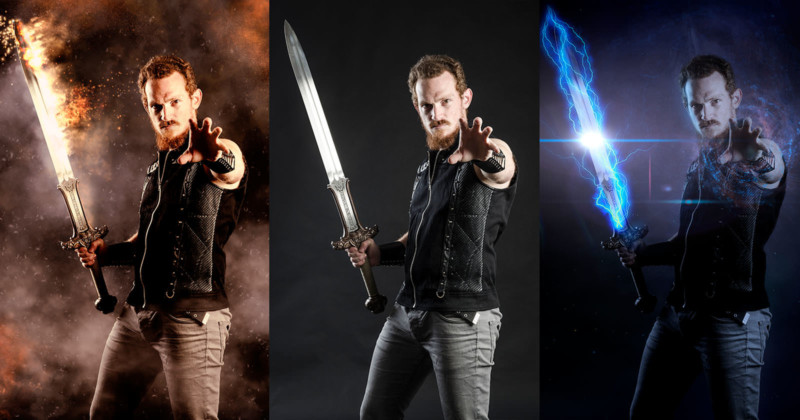
Creating compelling sci-fi and fantasy inspired images was once a task that required either awesome practical effects and lighting, dexterous digital paint skills, or a mastery of complex 3D animation software. Recently, Boris FX, an Academy Award-winning software company that has developed film and television visual effects tools for over 20 years, has leveled the playing field with the introduction Boris FX Optics.

Full disclosure: This article was brought to you by Boris FX
Optics is a standalone application and a plugin for Adobe Photoshop and Lightroom that brings Hollywood style lens flares, cinematic lighting effects, and feature film processing looks to the photo editing community. In this informative tutorial, VFX industry veteran, Ross Shain shows how to easily turn portraits into epic poster frames — without resorting to stock footage or overlay assets.

Getting Started

The Optics plugin can be launched directly from Photoshop or Lightroom. If you are using Photoshop, we recommend converting your layer to a smart object, then select your layer and go to Filter > Boris FX Optics 2022.
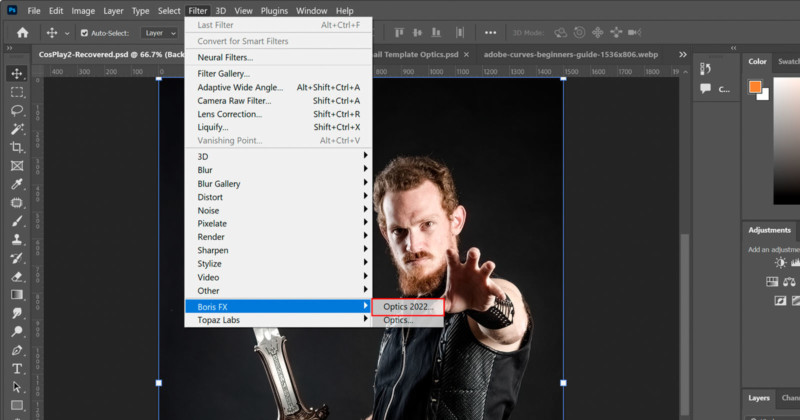
If you use Lightroom, launch Lightroom Classic, select your image, and go to Photo>Edit In Boris Optics 2022. We recommend applying Optics to a copy instead of the original.

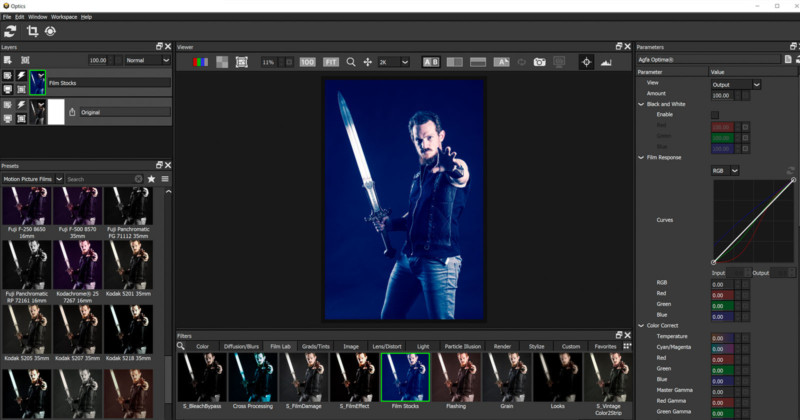
And if using the Optics standalone application, simply go to File>Open and open your photo. Whether you are using the plugin or standalone, working with Optics is the same. The interface is divided into a few key areas. Underneath your image, find hundreds of Filters broken in 10 categories:

Color, Diffusion/Blurs, Film Lab, Grads/Tints, Image, Lens/Distort, Light, Render, Stylize, and new Particle Illusion.

When you choose a filter, the selected filter Parameters are displayed on the right and the available Presets are on the left. In the upper left, you have the Layers window where you will find opacity and layer blend modes.
Lighting and Render Effects

Optics is packed with creative lighting filters and special effects generators that come from Boris FX Sapphire, a plugin collection that is regularly used on big budget films and TV shows. In the Render category, we can find useful background generators like Night Sky (star field), Luna (photorealistic moon generator), and even abstract background generators like Cautics and Tiles.
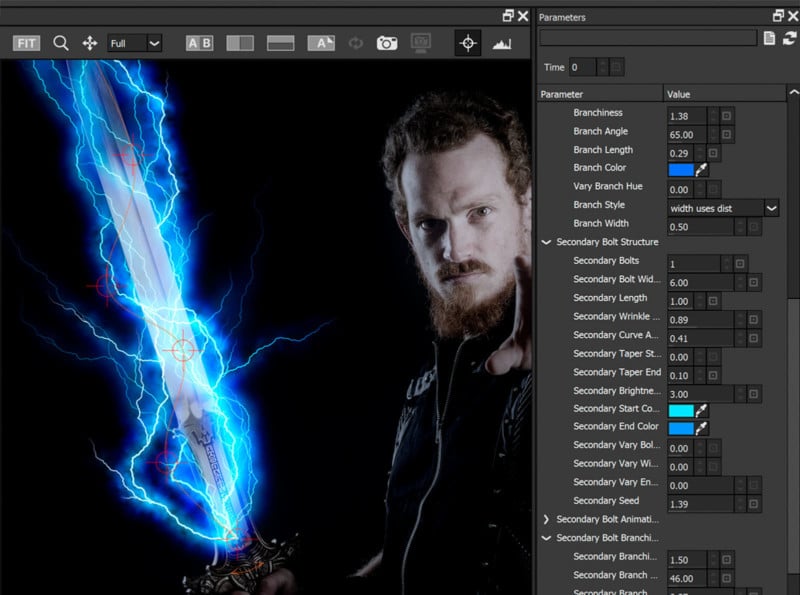
We can apply UltraZap which is an advanced lightning filter. You are never limited in Optics. In the Parameter window, you can control UltraZap options including the bolt position, color, branchiness, taper, glow, and so much more.

Masking Made Easy

Optics can import masks from Photoshop or use the built-in masking tools which offer a streamlined, simple way to isolate effects.
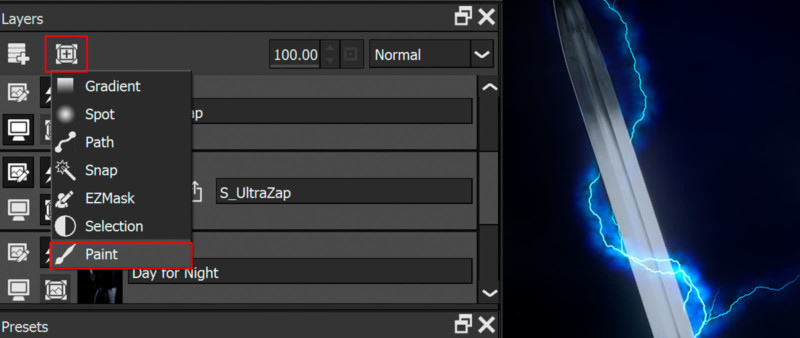

You can apply various mask types to every layer in Optics. For example, if we want to wrap the lightning effect around the sword, in the Layers window, we can add a Paint Mask and paint out the areas where the effect should not be shown. Other mask tools include Gradient, Circle, and Path as well as masking by luminance and color values. Read More...


Previous Post

PhotoPills: A Photographer's Guide

Next Post

Cleanup.pictures: How to Easily to Remove Objects From Your Photos

Comments